In an unprecedented cyber-attack, several NPM packages, with a combined total of 2 billion weekly downloads, have been compromised. The incident, which occurred on September 8, 2025, involved a phishing scam targeting a single maintainer responsible for numerous popular packages.
Affected Packages
The attack affected a wide range of packages, including but not limited to:
backslash(0.26 million downloads per week)chalk-template(3.9 million downloads per week)supports-hyperlinks(19.2 million downloads per week)has-ansi(12.1 million downloads per week)simple-swizzle(26.26 million downloads per week)color-string(27.48 million downloads per week)error-ex(47.17 million downloads per week)color-name(191.71 million downloads per week)is-arrayish(73.8 million downloads per week)slice-ansi(59.8 million downloads per week)color-convert(193.5 million downloads per week)wrap-ansi(197.99 million downloads per week)ansi-regex(243.64 million downloads per week)supports-color(287.1 million downloads per week)strip-ansi(261.17 million downloads per week)chalk(299.99 million downloads per week)debug(357.6 million downloads per week)ansi-styles(371.41 million downloads per week)
How the Attack Unfolded
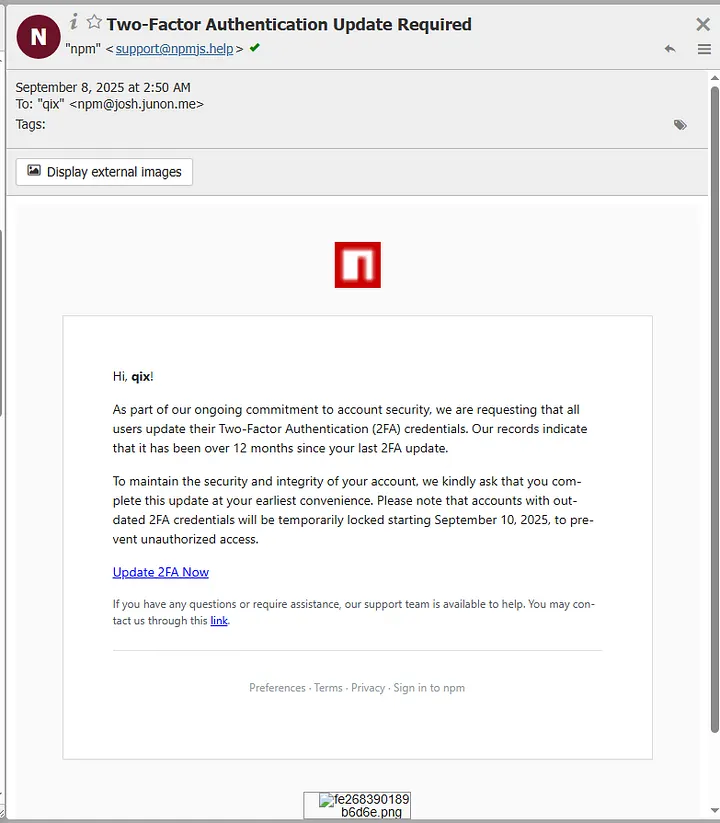
The maintainer, known as “qix” (Josh Junon), fell victim to a phishing email that mimicked npm’s 2FA reset-support message. The attackers used a spoofed domain resembling npm’s official site to facilitate the phishing scheme. Once access was gained, malicious versions of the packages were published with code designed to steal or redirect cryptocurrency transactions.
The malicious payload embedded within the compromised NPM packages is a crypto-clipper, a form of malware meticulously designed to siphon cryptocurrency funds. The attack chain is bifurcated into two primary vectors, each tailored to exploit different scenarios faced by cryptocurrency users.
- Passive Address-Swapping Attack: When a user does not have a wallet extension such as MetaMask installed, the malware initiates a passive attack. It hijacks the browser’s core network functions, including
fetchandXMLHttpRequest, to intercept web traffic. Using the Levenshtein distance algorithm, the crypto-clipper identifies and replaces legitimate cryptocurrency addresses with attacker-controlled addresses that look almost identical to the original ones. This method preys on the human eye’s inability to detect minute differences in long strings of characters, allowing the swap to remain undetected during casual inspections. - Active Transaction Hijacking: If a wallet extension is detected, the attack escalates to active transaction hijacking. The malware intercepts outgoing transactions, such as
eth_sendTransaction, and alters the recipient address in memory before the user signs off on the transaction. The user interface continues to display a seemingly legitimate transaction, tricking the user into authorizing the transfer of funds directly to the attacker’s wallet.
Immediate Actions to Take
- Check Dependency Versions: Examine your
package.jsonand lock files for references to any affected packages and verify the installed versions. - Look for Malicious Behavior: Monitor your system for any suspicious activity that could indicate compromise.
- Remove Affected Packages: Temporarily delete or replace the compromised packages to mitigate potential damage.
- Stay Updated: Keep an eye on the latest updates and releases of the affected packages.
- Install Secure Versions: Once the maintainers release verified clean versions, update your packages accordingly.
- Pin and Inspect Versions: Use commands like
npm ls chalkornpm ls ansi-regexto check the exact versions installed. - Search Lockfile: Scan your
package-lock.jsonoryarn.lockfor impacted versions using regex search. - Avoid Compromised Versions: Until clean releases are confirmed, refrain from installing affected package versions.
- Run Security Scans: Utilize
npm auditand other static code analysis tools to detect malicious code. - Monitor Official Announcements: Follow official npm and maintainer communications for updates on package integrity and checksums.
- Secure Your Systems: If compromise is suspected, rotate build secrets, scan CI logs, and treat affected machines as potentially compromised.
What the Community is Saying
Reputable security researchers and vendors such as Checkmarx, Semgrep, and KrebsOnSecurity have provided in-depth analysis and recommended steps for remediation. According to Arda Büyükkaya, a senior cyber threat intelligence analyst at EclecticIQ, the attacker’s crypto address showed a total of $66.52, underscoring the effectiveness of the community’s swift action. This minimal financial loss is a stark contrast to the potential damage that could have been inflicted had the issue not been addressed so quickly.
This cyber-attack represents a significant breach in the Node.js ecosystem, highlighting the vulnerabilities in open-source software supply chains. Developers and organizations are urged to follow the recommended actions to secure their applications and systems. The npm community and maintainers are actively working to clean up and restore the integrity of the affected packages. Stay vigilant and informed as the situation unfolds.
Source: Info-Security Magazine
Like my content? Support me with a tip!